Dashboard · the production overview
Give the producer Program, recording and streaming status, plus scene, source and audio controls.
The PaneLive workspace
PaneLive Pro brings production monitoring, control and studio cues to Android phones and tablets, iPhone and iPad, including older devices ready for a new job. For the full experience, use it with PaneLive Companion and OBS Studio or vMix. For a simpler setup, connect directly to your production software.
For a one-off event, subscribe to PaneLive Pro monthly and cancel when you’re done. Or try the yearly subscription free for 7 days.
Android 7.0+ (API 24) · iOS 16+ · iPadOS 16+. Put an older phone or tablet back to work.
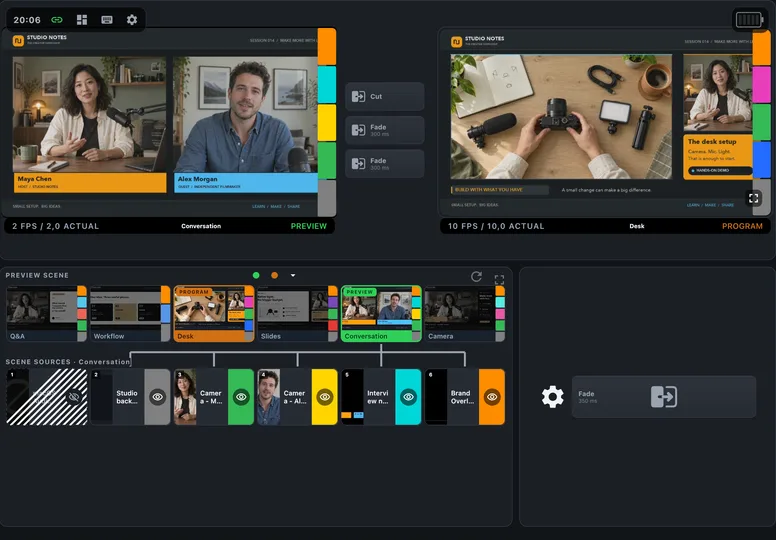
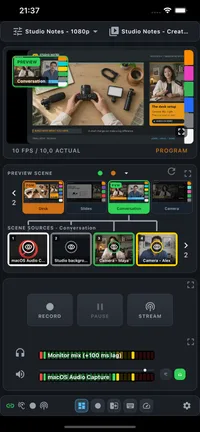
One PaneLive experience, across platforms
PaneLive looks and works the same on Android and iOS. Move from an Android phone to an iPad and keep the way you work: the same layouts, workflows and studio tools, adapted to your screen.
Your phone and your studio computer do not need to match. An iPhone can connect to PaneLive Companion on Linux, and an Android tablet can connect to PaneLive Companion on macOS or Windows. Mix devices in the same studio and give each one the role you need.
Prefer a direct connection? PaneLive on Android and iOS can also connect straight to OBS Studio, vMix or Streamlabs Desktop on your network, no PaneLive Companion needed.

Mobile app for
Desktop companion for
Android or iOS → OBS Studio, vMix or Streamlabs Desktop. No PaneLive Companion required.
Designed to reach older devices
Android 7.0 (API 24) or later. Give a spare Android phone or tablet a dedicated spot in your studio with PaneLive Pro. Check the installed Android version in the device’s settings: official updates vary by model, country and carrier.
iOS 16 and iPadOS 16 or later. The systems introduced in 2022 still reach much older hardware. An iPhone X from 2017 tops out at iOS 16 and meets PaneLive’s minimum, as does a 2017 iPad (5th generation) on its final major release, iPadOS 16. That spare screen can have another chapter as part of your production setup.
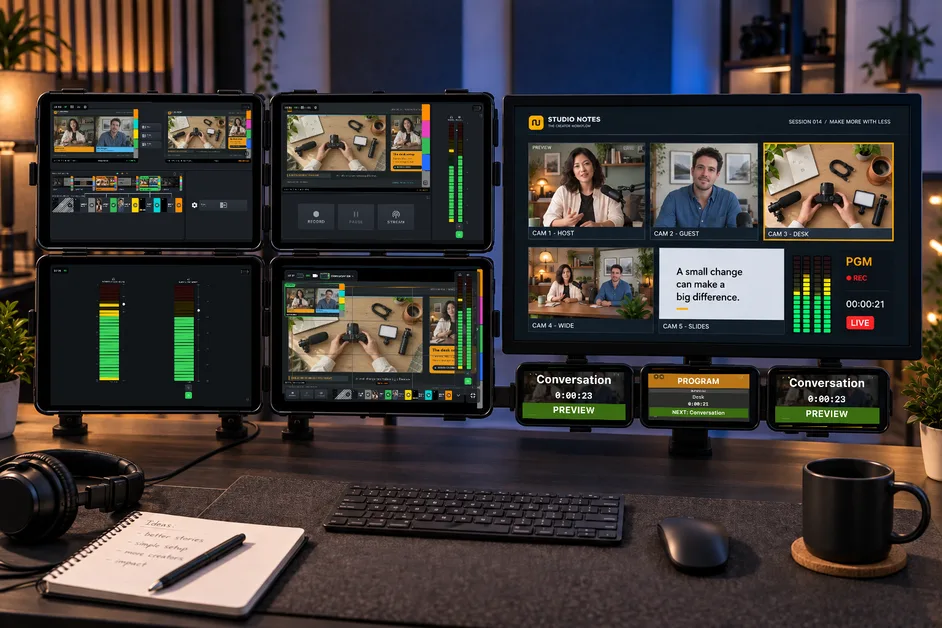
One production. Many focused screens.
Connect several phones and tablets to the same production through PaneLive Companion and share monitoring and control across the crew. Each device shows the workspace that suits the person using it, with only the controls and status that matter for their part of the show.
The producer gets the Dashboard, the person switching gets the Composition deck and whoever watches the outputs gets the Recording deck. A spare phone can stay on the Hotkey deck, and the scene and audio solo views focus on a single task. Tally views keep presenters and camera crew in step with the show.
You can also build a compact control station with multi-device mounts. Arrange phones and tablets in a row below the main monitor, above it, or in a grid to one side. Keep several views within reach at one desk, or spread them around the studio.
Choose the view on each device
Run different views side by side on the devices connected to PaneLive Companion. Whether someone is a Viewer or an Operator is set separately from the view they pick.
Give the producer Program, recording and streaming status, plus scene, source and audio controls.
Keep Preview, sources and transitions close to the person switching the show.
Give the person running the outputs a screen for Program, running time and recording or streaming controls.
Turn a spare device into a button panel for the shortcuts you use most.
Pull the scene or audio controls out of the Recording deck, so a device can focus on just that job.
Choose the Flood, Dot, Bar or Operator style and turn any screen into a tally light.
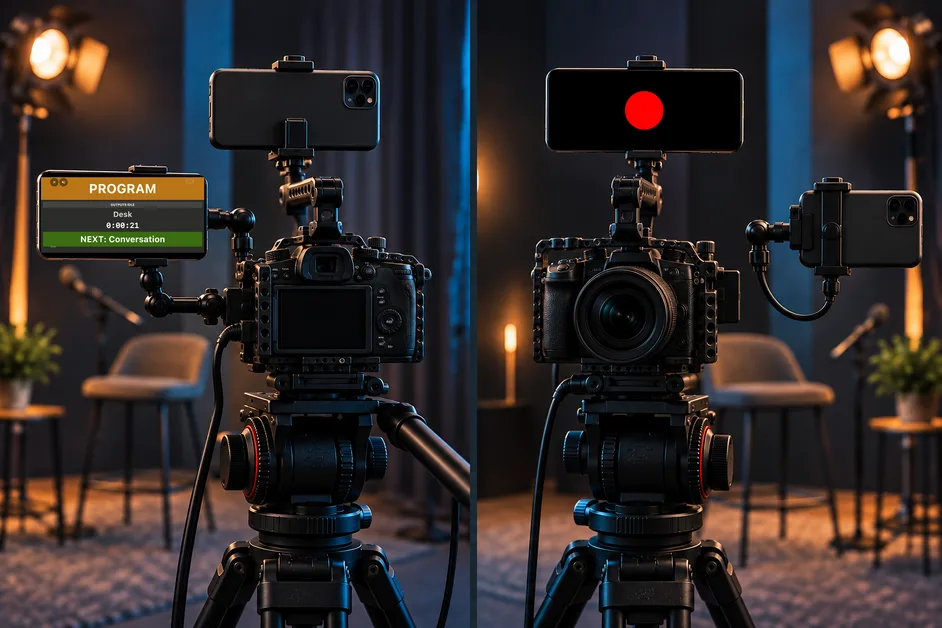
A clear cue for the crew
Give the camera operator a detailed Operator tally on a phone mounted to the side, and the talent a simple Dot tally on a second phone above the lens. Both screens stay in landscape, facing the person who needs the cue.
With PaneLive Companion, shared countdowns help everyone get ready for the next moment. Your older phones can keep helping out long after they stop being your everyday device.
Make it yours
Themes change the look, not what PaneLive can do. This website uses the Base theme.
Hover or tap to explore. Select again to enlarge.
OBS, vMix and Streamlabs compared
Explore what PaneLive Pro brings to each production setup. The guides cover direct and PaneLive Companion connections.
| Property | OBS Studio | vMix | Streamlabs Desktop |
|---|---|---|---|
| Video, direct connection | Screenshots at 1/2/5/10 FPS; Preview in Studio Mode | Separate Program/Preview SRT streams | No |
| Video through PaneLive Companion | WebRTC Program/Preview when available | WebRTC Program/Preview when configured | No |
| Frame rate options (Companion) | Program up to 15 FPS; Preview 1, 2 or 5 FPS | Same limits, depending on your vMix setup | No |
| Default frame rates (Companion) | Program 15 FPS / Preview 5 FPS | Program 15 FPS / Preview 5 FPS | No |
| Live meters | Yes | Yes | No |
| Listening to audio | PaneLive Companion producer mix, when available | Direct: OMT Headphones output. Companion: when configured | No |
| Input faders | -100 to +26 dB | -100 to 0 dB | -100 to 0 dB, Streamlabs curve |
| Recording pause | Depends on OBS output settings | No | No |
| Streaming | All destinations together | All together, or each destination individually | All destinations together |
| Studio workflow | Preview, transitions, Program | Preview and Program inputs, Cut and configured transitions | Studio transition |
| Extras | OBS Profiles/Scene Collections, thumbnails | Telestrator, solo/master controls | Horizontal and Vertical sources, scene collections |
Good to know
PaneLive works the same on Android and iOS. On Android, monitor audio keeps playing with the screen off. Voice features use your device’s built-in speech recognition, so make sure it is set up and allowed.
Keep your production computer and devices on the same trusted network. PaneLive Companion installs on that computer. For vMix video over a direct connection, set up SRT or OMT in vMix. With Pro, the Telestrator opens straight from the vMix web page.
Find your fit
Explore PaneLive Pro with a 7-day free trial on the yearly subscription. Features depend on your production software, device, connection and role.
| Property | PaneLive Pro | PaneLive · Free after trial |
|---|---|---|
| Advertising | No ads | AdMob ads |
| Best for | Production tools for a growing workflow | Essential control, monitoring and small projects |
| Saved connection profiles | Multiple profiles | One profile |
| Direct connections and PaneLive Companion adapters | Included | Included |
| Dashboard and configurable shortcut deck | Included | Included; production-software shortcuts |
| Recording and Composition decks, solo views | Included | Not included |
| Program monitoring | Depends on production software | Depends on production software; video limited to 1 FPS |
| Studio Mode, Preview and transitions | No two-scene project limit; depends on production software | Projects with up to two scenes; depends on production software |
| Fullscreen video and composition guides | Where video is available | Not included |
| Scene and source thumbnails | Where available | Where available |
| Mixer faders, mute and live meters | Where available | Where available |
| Monitor audio, headphone safety and playback volume | Where available | Not included |
| Record and stream controls, with stop and hold protection | Where available | Where available |
| Individual streaming destinations | vMix, when offered | All destinations together only |
| Switch OBS Profiles and Scene Collections | While not recording or streaming | Not included |
| Streamlabs collections and Dual Output context | Included | Not included |
| Voice Cues, calibration and custom macros | Needs on-device speech recognition | Not included |
| Start production countdowns | Included | Not included |
| Tally Lights | Multiple saved tally lights per device | One tally light per device |
| Teleprompter (private, shared or standalone) | All modes with PaneLive Companion | Master Player and auxiliary player (Monitor) modes with PaneLive Companion |
| vMix Telestrator | When set up in vMix | Not included |
| Themes, rotation and preferences | Included | Within available views |
Choose your subscription
Choose a competitively priced subscription inside the app. For a one-off event, subscribe to PaneLive Pro monthly and cancel when you’re done. Or try the yearly subscription free for 7 days. Prices vary by country and app store. Check your app store for current prices and subscription terms.
| Property | Monthly | Yearly |
|---|---|---|
| Subscription | Monthly subscription; no free trial, cancel any time | Yearly subscription; 7-day free trial |
| Payment schedule | Monthly | Yearly |
| Current price and terms | Varies by country and app store; check your store | Varies by country and app store; check your store |
Available studio features depend on your device, production software, connection method and access role.
For a one-off event, subscribe to PaneLive Pro monthly and cancel when you’re done. Or try the yearly subscription free for 7 days.